

Best Payroll Software And Services For Small Business (2026)

Source: Forbes (Read Full Article Here – Below is a consolidated version of the publication)
Author: Kristy Snyder
Publication Date: October 1, 2026
Quick Dive
Payroll services can streamline paying employees and handling taxes. Online payroll services are especially important for companies that want the flexibility to work remotely. Compare leading options to see which one fits your business size and budget.
Best Payroll Software
TimeTrex
Our research found that TimeTrex is the best payroll software for time tracking, earning a 4.9-star rating from our research team. Its rule-based time and attendance tool, paired with biometric facial recognition or browser- or web-based clocking in, make it easy to track hours that automatically sync to either the cloud-based or on-site payroll software.
If you have employees who work in the field, you’ll also love the geolocation features that capture the exact location—with images as proof—when they clock in. Most other payroll software charges extra for time tracking features (for example, Gusto charges $6 a month per person to add on time tracking to its base plan).
All of this means that TimeTrex can greatly simplify payroll calculations for companies with a lot of hourly workers, like those in the construction or medical industries. Since hours are pulled directly from the timesheet, you can spend less time adding up hours and calculating wages.
Patriot Software
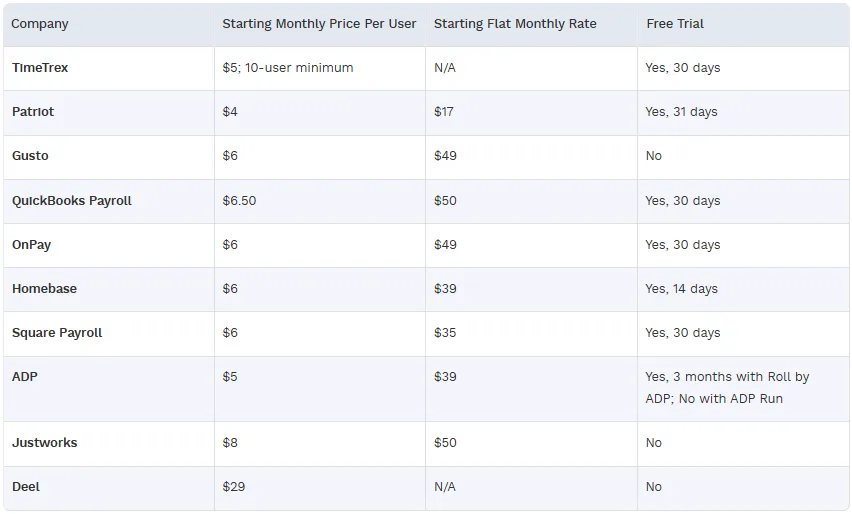
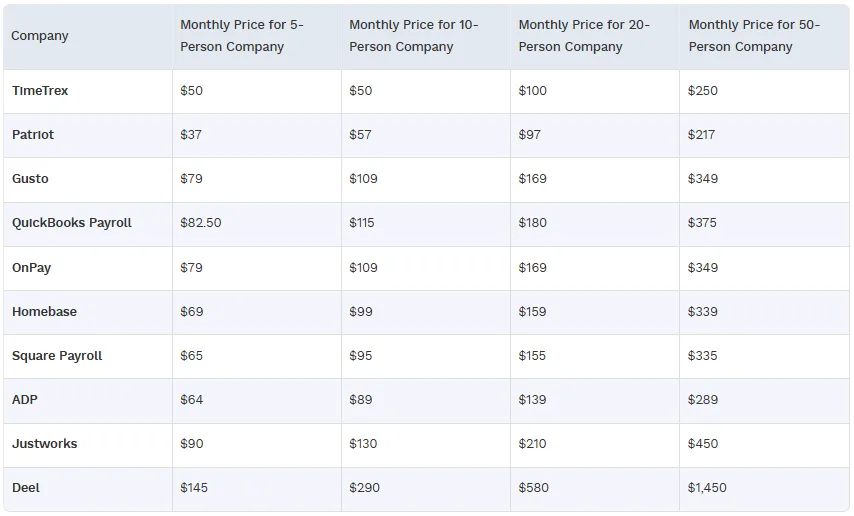
Our research found that Patriot is the best budget payroll provider, earning a 4.7-star rating from our research team. Pricing for this online payroll service starts at just $17 plus $4 per person per month, meaning you’ll pay under $100 a month for a 20-person company.
For reference, the second cheapest service on this list is TimeTrex, but it charges $5 per person a month with a $50 minimum, so in most cases, Patriot is more affordable. It comes loaded with all you need to run payroll, including free direct deposit, unlimited and automated payroll and health benefit integration.
The only downside of Patriot’s low payroll costs is that you have to pay to add on features that are included in other software. Time and attendance tracking and HR tools are both an additional $6 plus $2 per employee per month, which can add up fast and actually make Patriot more expensive overall. Therefore, we’d recommend Patriot to companies that just want a payroll service and nothing more.
Gusto
Our research found that Gusto is the best online payroll provider for integrated payroll and HR, earning a 4.6-star rating from our research team. Even its base plan includes a wide mix of HR and payroll features, including onboarding, offer letter templates, unlimited payroll runs and tax filing that can keep your processes more organized.
If you want more advanced features, like an org chart or performance management, you’ll need to upgrade plans, but this is still cheaper and easier than subscribing to an entirely separate HR software.
Gusto’s payroll offerings are also above average, including perks like multiple pay rates and schedules. You can also have Gusto register your state and local paperwork when you are filing in a new state, which competitors like TimeTrex don’t offer.
All of these combined tools make Gusto an excellent choice for businesses that want an all-in-one tool for HR and payroll.
QuickBooks Payroll
Our research found that QuickBooks Payroll is the best payroll provider for integrations, earning a 4.6-star rating from our research team. QuickBooks online payroll software integrates with over 800 popular business apps, including HR, banking, tax preparation, data management and more.
This is far more than some of the other picks on our list—for example, Patriot only has 10 integrations. The advantages of being able to connect all the other tools you use to your payroll provider are nearly endless. You can pull employee data from your workforce management system so you don’t have to reenter it, import your tax information to your accounting software or even apply for working capital so you have the funds to pay your workers on time.
As far as built-in payroll features go, QuickBooks excels with automated payroll, next-day direct deposit and an employee portal where your staff can access pay stubs and W-2s.
OnPay
Our research found that OnPay is the best payroll provider for multistate payroll, earning a 4.6-star rating from our research team. Using the cloud-based payroll software, you can pay employees anywhere in the U.S. with no extra fees, and OnPay automatically calculates all your federal, state and local taxes each payroll run.
This is a nice perk, as many other providers charge you for each additional state you run payroll in. For example, you’ll pay a $12 fee for each additional state you file taxes in with Patriot.
While OnPay doesn’t handle state tax registration for you directly, it does partner with Middesk if you need help. Middesk costs $199 for an account, and you’ll pay additional fees if you need a Secretary of State registration.
OnPay is an excellent choice for companies with a lot of remote employees spread across the country. However, things like performance management and recruiting are missing, meaning OnPay might not work as you start to scale.
Homebase
We found that Homebase is the best payroll provider for an automated solution, earning a 4.6-star rating from our research team. Once you build a schedule with Homebase’s cloud-based payroll software, employees can clock in and out for their shifts and their hours are automatically added into payroll.
Everything is automated for you, including wages, tips, breaks and overtime, which should drastically reduce the amount of time you spend on payroll each period. There are even options to integrate your POS so you can automatically add tips into payroll without any complicated math on your end.
In addition, perks like unlimited payroll runs, multiple locations in one payroll run and bonus and commission payments are all really useful and not included in every payroll software. The one downside is that to get some of these perks, including the tip manager and next-day pay, you have to upgrade to Homebase’s highest-tier plan or pay for the add-on, which can get pricey.
Square Payroll
Our research found that Square Payroll is the best payroll provider for paying contractors, earning a 4.5-star rating from our research team. It costs just $6 per contractor per month to use the online payroll service and includes 1099s at the end of the year.
Many other payroll providers on this list require you to add on contractor payments (like Justworks) or subscribe to a full payroll plan to access them. Square doesn’t, meaning you can save more of your hard-earned money.
With contractor payments, you’ll get unlimited payroll runs with no long-term contract, and you can pay contractors via check, direct deposit or Cash App. While payroll tax calculations are automatic, the contractor plan doesn’t provide tax filing or payments, so you’d need a full-service plan if you wanted that feature.
Speaking of the full-service plan, it’s loaded with many of the tools your small business needs, including employee self-onboarding, labor-cost reporting and multistate tax filings and payments.
ADP
Our research found that ADP is the best payroll service for scaling businesses, earning a 4.4 star rating from our research team. ADP’s cloud-based payroll offerings start with a simple yet functional payroll app (Roll by ADP) and scale all the way up to combined payroll and HR plans (ADP Run).
And when you’re ready to transition from small business to enterprise business, ADP also offers payroll services for companies with more than 50 employees that offers additional features, such as workforce management and benefits administration. Most payroll software will let you add on as many employees as you want, but they don’t necessarily add on additional features as you grow.
ADP is also great for scaling businesses because of its general ledger support, which lets you export journal entries directly into the accounting software of your choice. All plans also come with excellent employee portal tools, including a mobile app.
Justworks
Our research found that Justworks is the best payroll provider for compliance, earning a 4.3-star rating from our research team. Justworks’ cloud-based payroll software handles payroll taxes and filings across multiple states or countries at no extra cost.
That’s a unique feature, as many companies on this list, like Square or OnPay, don’t offer global compliance. If federal or state regulations change, Justworks also alerts you so you can act.
Justworks also files W-2s, W-3s, 1099s and Forms 940 and 941 on your behalf and provides access to workers’ compensation, which is required in all states except Texas and South Dakota. You can add on state unemployment insurance and COBRA administration.
Companies with a lot of hourly workers may also want to add on the time tracking module to help keep payroll records more accurate. It keeps track of all overtime calculations and rest and meal break rules so you stay compliant every time.
Deel
Our research found that Deel is the best payroll provider for global payroll, earning a 4.2-star rating from our research team. You can use its global cloud-based payroll software to pay workers in 50+ countries using foreign exchange payments, local payment rails or multi-currency payouts.
Many of the other payroll providers on this list don’t offer international payroll at all, let alone on this scale or price point. For example, Justworks only has the option to pay international contractors unless you choose its employer of record services, while Deel charges $29 per user per month for any kind of global employee.
That fee gets you local tax and statutory filing and reporting with country-specific pay rules and calculations. Pair that with the integrated reporting and payroll analytics, and Deel is the perfect tool for taking your company abroad, as it’ll help you with global compliance every step of the way.
Payroll Focus Group Takeaways
We could spend all the time in the world researching the best payroll processing software, but understanding what real business owners value helps ensure our analysis reflects real-world priorities.
That’s why we decided to conduct a 16-question survey using a focus group of 50 small business owners, founders, finance leads, HR leads and operations managers involved in choosing or managing payroll services.
We used our findings to validate our methodology categories, spot gaps and ground our emphasis on what consumers actually value.
How Real SMBs Choose a Payroll Service
Our goal with the focus group was to find out what genuinely matters to consumers when choosing and using payroll solutions. We noticed several clear conclusions about what drives SMBs to choose a payroll service, as well as what influences them in the other direction.
Primary Decision Drivers
To find the top decision drivers for small businesses, we asked them to rank their top five considerations. Here were the most important things that drove their decisions.
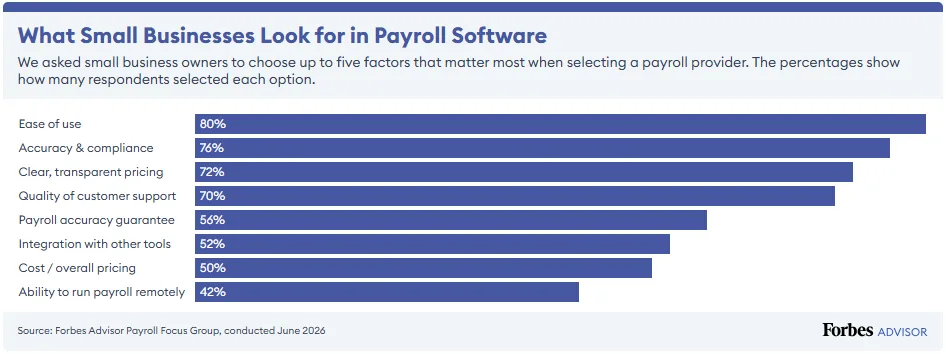
But not so fast—these results act as an amalgam of the top five choices. To find out which factor truly carries the most weight when ranking payroll providers, we also asked respondents what their top choice was. Surprisingly, accuracy and compliance came out on top on this question, with 36% of respondents claiming it’s the most important factor.
When the noise of other concerns is stripped away, accuracy is what SMBs care about the most.
Another interesting thing we found was the importance of human support. We asked respondents how important human support is when choosing a payroll provider, and 92% said it was either essential or very important. Eighty-six percent went on to rank phone support as an expected support option.
I don’t like to talk to a chatbot because they don’t always understand. I need a human—customer service is my top everything.
— Kristy L., cleaning company owner
Finally, pricing transparency was another key consideration for most small businesses. SMBs aren’t necessarily looking for the cheapest option, but if they don’t know what they’ll pay up front, providers are eliminated before they even evaluate features.
Instant Deal Breakers
Speaking of eliminating providers, there were several factors our respondents indicated would automatically be a dealbreaker for them.
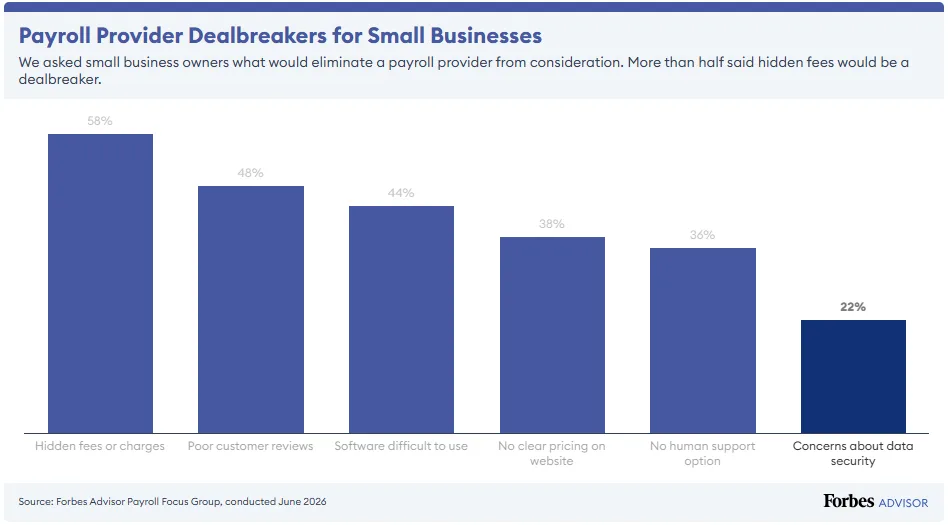
Respondents did not treat hidden fees as just a cost issue; they treated it as a trust issue. Poor reviews work in a similar way: they can keep a provider from making the shortlist before features or pricing are considered in detail.
This reinforces the importance of pricing transparency and customer experience signals. It also supports looking beyond advertised entry-level pricing and trying to understand how clear the total cost is for a typical customer.
A payroll provider has to be trustworthy, prices up front—no hidden fees, nothing that will cause me not to trust you.
— Cheyenne H., retail business owner
Shortlist Triggers
It’s not all negative, however. There are certain factors that can instantly make a payroll provider jump to the top of an SMB’s list.
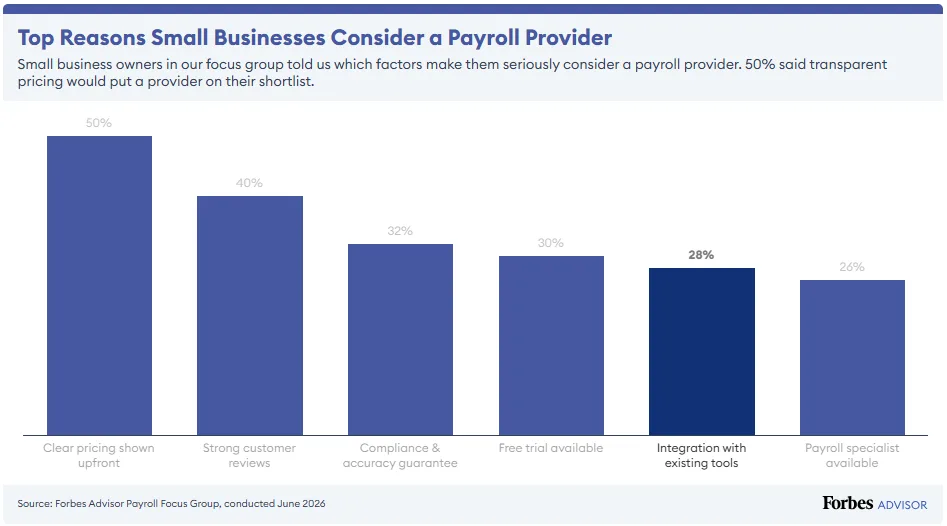
Again, the importance of clear pricing is clear to our respondents. They want to know what a service will cost them without jumping through hoops or selling their soul.
Having strong reviews—but not testimonials—is also key. In fact, strong customer reviews beat case studies and testimonials 31-to-1 as a trust signal.
What Real SMBs Wish They’d Known Before They Made Their Decision
Unfortunately, many small businesses did not have insights from a focus group before making their payroll decision. But luckily, you can learn from their mistakes.
Here are some of the things our focus group participants wished they’d known before choosing payroll software, along with tips on how to use this information to better inform your decision.
The True Total Cost
Many respondents discovered fees they hadn’t anticipated, like add-ons, per-employee rate increase and charges for extra features. Always do thorough research on pricing before you sign anything, and make sure you get a contract that outlines all your expected costs for the length of your term.
What Setup Actually Involves
Some of the respondents in our survey abandoned payroll software because the setup was harder than they expected. To avoid this, temper your expectations. Switching payroll billing software will take more than a day; several weeks is more normal. Also, look for providers with guided onboarding and advanced customer support options.
What Happens When Something Goes Wrong
Several people discovered their provider had no phone number, no payroll-specialist support or unacceptably slow response times when they had an urgent issue at payroll deadline. Make sure to vet customer support contact options before signing up with a provider, making sure they’ll be available during the hours you typically process payroll. You might even try reaching out ahead of time with a few test questions to see what the response is like.
Whether It Handles Their Specific Situation
Several participants discovered post-purchase that their provider hadn’t anticipated their setup—one even rolled their own system as a result. If you have any type of unique setup, like a multi-state workforce, union schedule, blended employee and contractor payroll or S-Corp owner pay, make sure the payroll software you’re looking at can handle it before signing on the dotted line.
What Integrations Really Mean
Just because software has hundreds of integrations doesn’t mean they’re quality integrations. Participants found integrations broke on updates, required manual fixes or synced unreliably, none of which was apparent pre-purchase. To make sure this doesn’t happen to you, dig into reviews to see if you can find users who have used the same integrations you plan on using, or try to get a free trial so you can test it yourself.
That the Manual Route Stays Viable
A notable minority of participants, particularly those with low transaction volumes, wished they had known how much can still be managed manually or with a simple spreadsheet before paying for software they underused. Avoiding this regret will require some introspection on your part to think about how many people you’ll be paying, how complicated your current process is and whether it’s worth paying a fee every month.
AI Features of Payroll Software
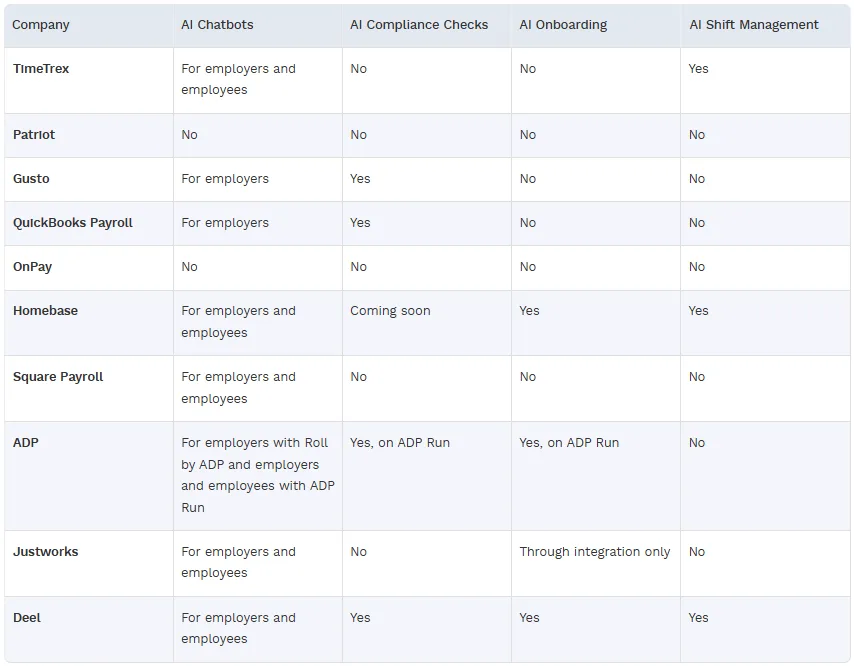
Despite only 22% of respondents in our focus group wanting an AI chatbot in their payroll software, many payroll software companies are rushing to include AI tools like chatbots, compliance checks, onboarding and shift management.
Top Payroll Software and Services Pricing
When it comes to pricing, 50% of respondents in our focus group rated the overall cost as one of the most important factors in choosing a payroll service. This table clearly lists the starting monthly price per user, the flat monthly rate and whether a free trial is available for each of the best payroll software for small businesses.
Payroll Software Monthly Costs by Company Size
It’s not always easy to understand what your company’s actual payroll bill will be. Here’s a closer look at how monthly and user fees add up for companies with five, 10, 20 and 50 employees if you choose one of the best online payroll software on our list.
Best Payroll Services Features
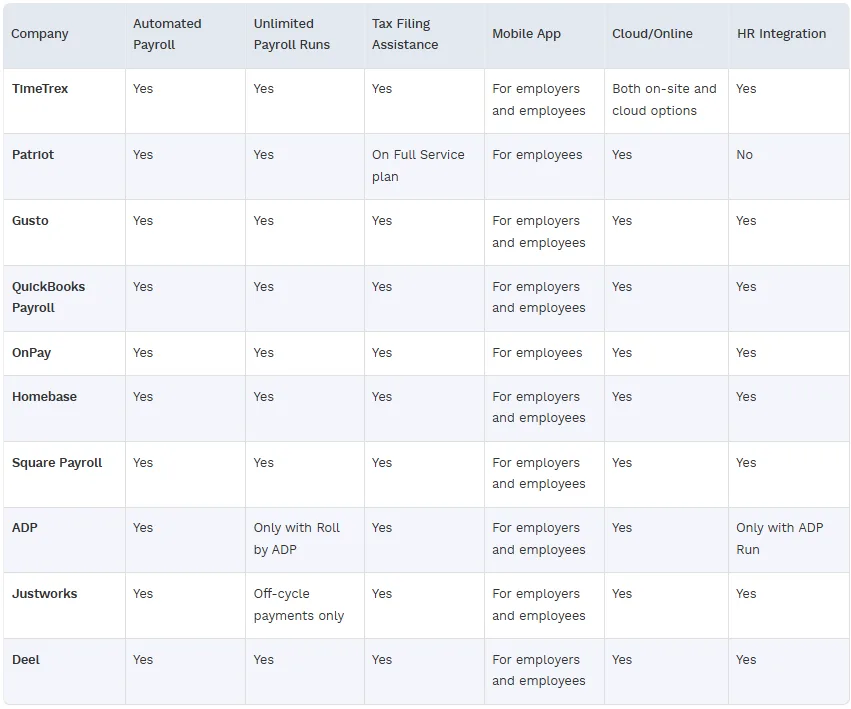
This table describes the core features offered by the top payroll providers for small business, including automated payroll, unlimited runs, tax filing assistance and mobile app availability. We also considered whether it’s an online payroll provider and if it has HR integrations.
User Opinions of Payroll Software for Small Business
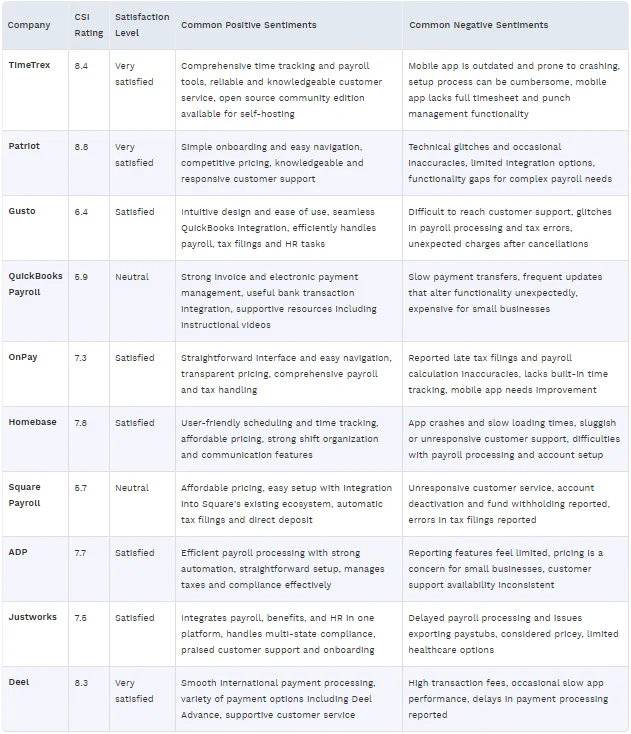
Forbes Advisor collects consumer sentiment both directly through NPS surveys and indirectly by collecting customer feedback across the internet using the Consumer Sentiment Index (CSI). This is how real customers described their opinion of the top payroll services for small business:
Essential Small Business Payroll Service Features
When you’re looking for a payroll solution for your small business, you’ll want it to have the following features:
- Automated processes. Automating payroll processing reduces the likelihood of payroll mistakes and also gets employees their paychecks faster.
- Built-in compliance. Payroll tax filing and payments need to be done right the first time to avoid costly penalties. The best payroll services automatically file and pay employee tax withholding and other obligations to keep your company compliant.
- Direct deposit. Nothing will sour your relationship with your employees faster than delays in delivering their pay. Next-day direct deposit can be a huge perk that keeps employees loyal.
- Employee portal. All payroll services should offer employees access to their payroll data through a secure portal and mobile app.
- Cloud vs. local. You can access the best online payroll services from anywhere, making this feature a must for remote teams spread across multiple locations. Local software has too many limitations for the modern world, as data isn’t updated in real-time and can’t be worked on by multiple people at once.
- HR tools. Payroll is just one part of the greater HR ecosystem. Having built in tools for other HR functions, like employee management or recruiting, streamlines your operations and keeps employee data in one central location.
- Contractor support. Contractors have unique pay considerations, so you’ll want a payroll software that knows how to manage them.
- Reliable customer service. If something goes wrong, you should be able to get in touch with a real person via phone, chat or email any time of day.
There are digital providers out there that don’t have even a toll-free number to call. For me, that’s an immediate red flag.
— Edward L., memorabilia store owner
How To Choose the Best Payroll Service for Small Businesses
Finding the right payroll service for your small business isn’t as hard as finding a needle in a haystack. In fact, it’s quite the opposite. Here are some of the main things to consider before deciding on a payroll service for your small business.
Pro Tip
I always recommend looking for providers that offer a unified platform with integrated HR, scheduling and payroll all in one place. Also, if your company operates in a compliance-heavy industry, look for a provider that integrates compliance expertise and regulatory knowledge to further streamline and reduce risk.
– Deborah Saneman, CEO of Würk, a payroll and HR solution for compliance-centric industries
Assess Your Company Needs
Every company has slightly different needs when it comes to payroll. For example, if you employ a lot of remote workers, you’ll want software that has multi-jurisdiction tax compliance. Or if you have a lot of freelancers you work with, you’ll want payroll software that can handle contractor payments.
Think about exactly what you need out of payroll software before you make any decisions. Consider how many employees you have, how fast you’re growing and how much time you have to dedicate to payroll each cycle.
For a business like ours, what makes a really great payroll provider is set it and forget it.
— Susan S., investment firm CFO
Evaluate Payroll Compliance Capabilities
I’m looking for something that takes the burden of compliance off my plate.
— Gary K., 4-employee retail business owner
Every state and city has its own labor laws you’ll need to comply with. Knowing all the rules and regulations for every locality is impossible, and likely why 52% of respondents in our survey said that compliance is stressful. Choosing payroll software that can keep it all straight helps reduce that stress.
Small business online payroll software automates many of these compliance requirements such as filing and paying payroll taxes automatically and alerting companies to upcoming compliance deadlines. They also help businesses classify their workers correctly as employees or contractors to avoid being fined for misclassifications, and they provide a record of payroll and employee time and attendance.
An important question to ask is how the provider manages tax compliance. Do they have a compliance team? Does the provider prepare and file the tax returns? What is their approach to keeping tax tables updated and addressing new compliance throughout the year?
— Mary Novak, payroll director at myHR Partner, an outsourced HR firm
Review Third-Party Payroll Integrations
It’s common to integrate payroll software with other tools like employee time and attendance tracking, scheduling, retirement plans and health benefits, recruiting, compensation management and general accounting systems. Linking up these other systems means you won’t have to perform double data entry, once again saving you valuable time.
Unfortunately, poor integration quality was a leading frustration for 52% of respondents in our survey. So even if a payroll service has the integration you’re looking for, double check that it functions well before going all in.
Look for AI Tools
Many payroll automation software are adding AI tools that can be a huge timesaver for small businesses. Features like automated timesheet approval and error detection mean you don’t have to manually check every entry yourself for problems. All you have to do is connect your data and let the robots work for you.
That said, don’t dabble too far into the AI pond. Only 22% of respondents in our survey expected to have access to an AI chatbot, meaning that human means of support are still preferred. Only having access to an AI chatbot means you might not be able to get the help you need when you’re in a time crunch.
Compare Pricing and Value
Most payroll software costs a flat fee plus a fee per user each month, but some also charge only a flat fee or user fee. When comparing payroll software costs, make sure you’re accounting for all the variables. For 52% of the respondents in our survey, unexpected fees or charges were one of their number one frustrations.
But beyond your monthly fees, you also have to think about the fees and penalties you’ll pay if your payroll isn’t done right.
Our advice? Don’t go with cheapest option because it’ll save you money today. You have to find the software that has the best overall value for your business. In many cases, slightly more expensive software that’ll save you more time and keep you more compliant is far more valuable than a bargain tool.
I evaluated a number of different payroll providers, and a number of them just didn’t have transparent pricing. And so I just eliminated them out of hand.
— Alex B., tech company owner
Read Customer Reviews
Often, the best way to know how a payroll software works is to read reviews from real customers. Their experiences can tell you more than any demo or free trial can, as they’ve actually used the software on a day-to-day basis. Customer reviews also beat out case studies and testimonials 31-to-1 in our survey, meaning consumers are looking for feedback from real users, not polished data from a marketing department.
When reading reviews, look for common complaints. Seeing the same issue repeatedly means you’ll likely have that problem, too. Likewise, if you see recurring positive comments about a feature, you can have more peace of mind that a software excels in that area.
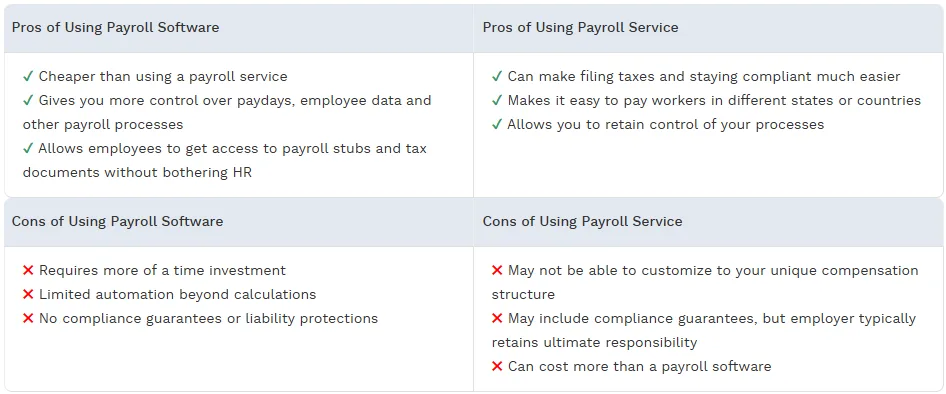
Pros and Cons of Payroll Software vs. Payroll Service
Payroll software is a tool that you can use to manage payroll on your own. It’s more of a guided DIY option, where it automates payroll calculations and generates required forms, but leaves all execution, tax filing and compliance responsibility with the employer.
A payroll service is a little different. It also automates payroll but includes provider-managed tax filing and remittance, while still giving you control over payroll inputs, timing and approvals.
Payroll software and payroll services each have their own pros and cons—here’s how they stack up.



Stay Connected
Sign up for emails to hear about promotions!
"*" indicates required fields